Here are simple steps to link asset publisher portlet between 2 pages. You can click on Read More on Page 1 and you can see the full view on Page 2.
1) Create a page “Page1” and place Asset Publisher portlet on this page
2) Configure the Asset Publisher portlet the way you would like to
3) Create a second page “Page2” by copying the page “Page1” in to it.
4) Go back to “Page1”
4.1) Go to “Look and Feel” Menu of Asset Publisher Portlet.
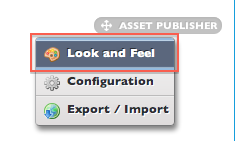
4.2) In the Portlet Configuration tab, look for Link Portlet URLs to Page drop down

4.3 )Select “Page2” from dropdown, Save and Close the popup.
You are all set.
 Knowledge Share
Can you plz give your contact detail like skype orgmail ?